
 UPDATED TUNE FILE DOWNLOAD STEPS. READ BELOW - THIS DOES NOT CHANGE PDF'S AND OTHER FREE DOWNLOADS, ONLY CUSTOM TUNES AND XDF'S THAT THE PURCHASER HAS REQUESTED THEM TO BE LOADED SEPERATE FROM THEIR PORTAL FOR DOWNLOADING BY OTHERS.
To ensure customer files are safe, your downloads can now be initiated by the purchaser. What does this mean? Well, now once you purchase a revision, new tune file, or buy the DIY tuning setup for someone else (like if you are a Dealer or Shop); you will purchase like normal but the files will NOT be loaded by us to that order if requested.
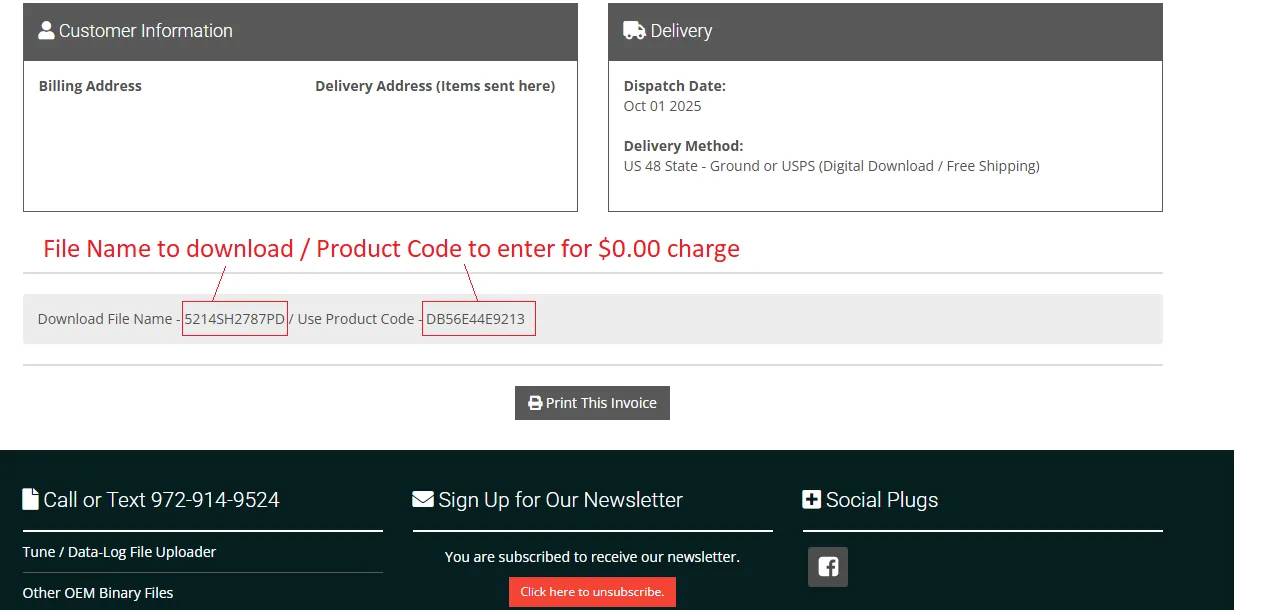
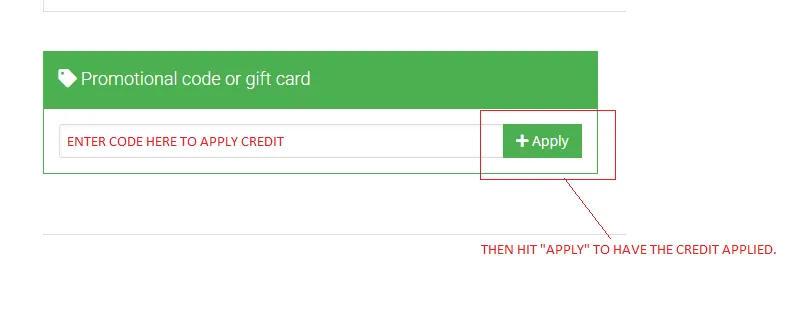
Instead, you will be given an access code(s) and be instructed to navigate to the Customer Purchases area and add your named downloads (which is a certain code in your order details) to your cart. Once added, continue to checkout but add the separate / other code (not the named download code) to the "Promotional Code" text box and hit "Apply". The credit for the downloads will be applied and you will have a $0.00 charge to download them. Example -- If your Revision costs nothing, you pay nothing. But if your file is a Custom file that has charges, you already paid for them in the Original order, so you still pay nothing extra to download them.
Now, these "Codes" get developed after the files are created, but is ONLY allowed to be used once, and expires 1 month after issued.... WAIT!! WHAT??? NOW What does THAT mean? It means PROMTLY download ALL of your files at the same time, because once that is done, we delete them in the system and they are stored offline for security reasons. This might mean (chances are pretty good here) that you have a separate order(s) pop in your account BEFORE your hardware arrives.
Don't worry, once you finish the checkout, the file copy still stays active for 2 download attempts and DOES NOT expire. This will not only ensure your files are safe for you, but allows for less stress on our server with files weighing storage paths down.
We realize that you have to go through extra steps to get your files, but think like we do for a second. We are trying really hard to keep your stuff safe and secure, and want no possible issues. Even if we haven't had an issue, we still take no chances. Make sense??
All of this being said, you can still download all of our free (ones that are) tunes like normal here.
See below the screenshot of what the box will look like when you want to download your stuff for no charge. All other downloading functions remain the same, and you still have them available in your portal for 2 times.
When you buy a Tuning Package, Tune File or Tuning Template from us, you need to be able to download the needed files to use. **NOTE: The site may look different than what you see in the images below. That is because WE UPGRADED the look. Functional aspects are still the same!**
We have a file system that protects your files even better than our original system, which anyone with the directory could retrieve them as often as they like.
Now, if you are a REGISTERED Customer you get 2 download attempts of each file and they're saved in your Portal. NON REGISTERED will get 1 as the link sent to your email will kill 2 credits when clicked on. This ensures file security and less chances of possible corruption. When you complete a download purchase, some files are available instantly and some require a direct push from admin. The links only expire after 2 download attempts, not after a certain time limit.
You must either have one of two things to get your file(s).
This page will help you retrieve the files so you can begin using your software.


How to get your XDF Use Key / Password


Email stating "Your Files Are Ready" or something like that, will look like this. Either way look out for it, and click the link.

 | 972-914-9524 / Call or Text |
 | eMail / sales@mark8.site |
Home of The CalibrVIIItor © Tuning Platform Serving North Texas and Worldwide since Y2K!!
M-F 10am-4pm / Sat 10am-12pm | Online 24/7/365
Ordering / Tuning Call or Text 972-914-9524
Call or Text Us 972-914-9524
©2018-2026 Mark8.site - Content Managed By Level 304 Media / GeLBie Productions Partnership - All rights reserved.
DISCLAIMER: By using this site you agree to our Privacy Policy and understand we hold no liability if you utilize our tech section or tuning software and break your car. NEVER tune a car with mechanical problems expecting it to work properly! That will only cause more problems than you need. FIX YOUR MECHANICAL PROBLEMS FIRST! Every vehicle reacts differently to tuning, and no two vehicles are alike in any way. See our Terms & Conditions for all purchasing details about using our storefront and portal.
We do not sell or advertise products or tuning files that defeat vehicle emissions components. We do not encourage you to pollute the air we breathe. If you use software that has emission deleting functions, we reserve the right to decline the sale of our tuning files, products and services all together. Some regional restrictions are in place and completely enforced for certain products or services. *Free Lifetime Tunes are for Revisions in the same combo category.
This website is built and managed by fellow Lincoln Mark VIII Enthusiasts from money out of their own pockets.
Feel free to help them out by making a purchase to allow them to add more stuff for you. ( ͡° ͜ʖ ͡°)
We Proudly Support These Custom Tune Files, Hardware and Software On Our Site.
 |  |  |  |  |



eCommerce by CubeCart